


How to Program Holiday Schedules

Dec 24, 2025
 109
109
How to Program Holiday Schedules
- Login to Entrapass Web.
- Click on the Holiday tab, then Click on the Add button.

- Give a name to the holiday under Primary Language then select the date of the holiday by pressing the calendar icon.
- If the holiday is recurring, check the Recurring box.
- Assign the holiday to a holiday group by clicking both System and Site options. Typically, Hol 1.
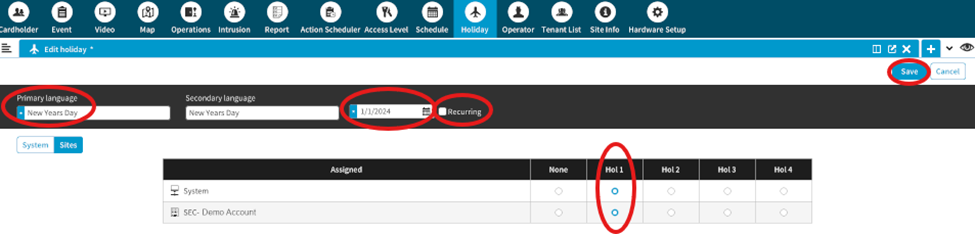
- Click Save in the top right.
- Repeat for any holiday that you wish to add.
You are all done!
Click here for a full video tutorial.

