Charge the VDB780B Wireless Video Doorbell Battery

May 21, 2026
22

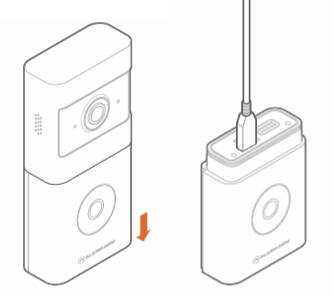
To charge the VDB780B Wireless Video Doorbell battery (a fully depleted battery takes about 7 hours):
1. Unscrew the screw that secures the latch on the bottom of the mount.
2. Unlatch the bottom of the mount.
3. Remove the VDB780B from the mount.
4. Separate the battery pack from the VDB780B body.
5. Plug the supplied micro USB cable into the battery pack.
6. Plug the USB end into a 5V/1.5A USB wall charger and plug it into an outlet.
7. The top charging LED will be solid orange while charging and solid green when fully charged.